
Many Spectrum users report the same confusing issue: internet speed tests show 500 Mbps, but gaming still lags badly. Whether you’re using a high-performance Xbox Series X, PS5, or gaming PC, latency—not speed—is the real culprit.
If you’re stuck with Spectrum as your only provider (as many users in townhome complexes are), don’t worry. In this guide, BestISPDeals breaks down what’s really causing your lag, how to reduce it, and what Spectrum plan and hardware setup is best for gaming in 2025.
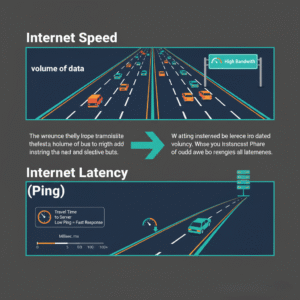
Speed vs Latency: Understanding the Real Gaming Issue
- Internet Speed (Mbps): Measures how fast you can download or upload files.
- Latency (Ping): Measures how fast your console communicates with the game server.
Gaming relies on latency, not just speed. Even a 5 Mbps connection is enough for most online games—what matters is your ping and packet loss.
Ideal Gaming Latency Range:
| Ping (ms) | Gaming Experience |
|---|---|
| 0-40 ms | Excellent |
| 40-60 ms | Good / Playable |
| 60-100 ms | Noticeable lag |
| 100+ ms | Unplayable lag |
Common Causes of Gaming Lag on Spectrum
1. Routing Issues
Spectrum’s data may be routed inefficiently to the game server. Even if you’re located in Florida, your connection may hop through other states (like Georgia) before reaching the game data center, increasing lag.
2. Packet Loss
This is when data never reaches the server. Even a 1% loss destroys gameplay.
3. Router Limitations
The standard Spectrum-provided router may not be optimized for gaming traffic, causing latency spikes even over Ethernet.
4. NAT Type: Moderate or Strict
A moderate NAT can limit server connections and add network restrictions.
How to Fix Spectrum Gaming Lag (Step-by-Step)
Step 1: Test Latency In-Game
Most games like Call of Duty offer a network overlay to show:
- Ping
- Packet Loss
- Server connection
If your ping is high only in certain games, the problem is likely game server-based, not Spectrum.
Step 2: Use Wired, Not Wireless
Wi-Fi causes instability. Ethernet provides the most reliable latency.
Step 3: Upgrade Your Router
Consider a gaming-optimized router with:
- QoS (Quality of Service)
- Dual-band WiFi 6 support
- Advanced port forwarding
Recommended: Netgear Nighthawk or ASUS ROG series
Step 4: Port Forwarding
Open ports for Call of Duty and Xbox Live to improve connection stability.
Step 5: Contact BestISPDeals
We can help you:
- Upgrade to a Spectrum plan with better routing priority
- Add fiber-backed routing where available
- Get promotional pricing with activation and equipment discounts
Call BestISPDeals at [Your Contact Number] to optimize your gaming setup today!
Best Spectrum Plans for Gamers (2025)
| Spectrum Internet Plan | Speed | Best For | Gaming Latency |
|---|---|---|---|
| 100 Mbps | Light gaming | Casual users | Moderate |
| 500 Mbps (Recommended) | Competitive gamers | Smooth downloads + stable latency | Optimized |
| 1 Gbps Fiber/Ultra | Pro gamers or streamers | Best latency & routing | Excellent |
Even if speed isn’t the cause of lag, higher-tier plans often get priority routing, which reduces latency during peak hours.
Final Thoughts
Spectrum is not always the problem—but the default setup you receive from Spectrum often is. Lag in games like Call of Duty is usually caused by:
- Game server routing issues
- NAT type restrictions
- Router performance bottlenecks
With BestISPDeals, you get expert guidance, optimized plans, and router upgrade solutions customized for gamers.
Ready to Eliminate Lag?
BestISPDeals can upgrade your Spectrum connection for gaming perfection.
Contact us now for special pricing, equipment upgrades, and expert setup assistance.