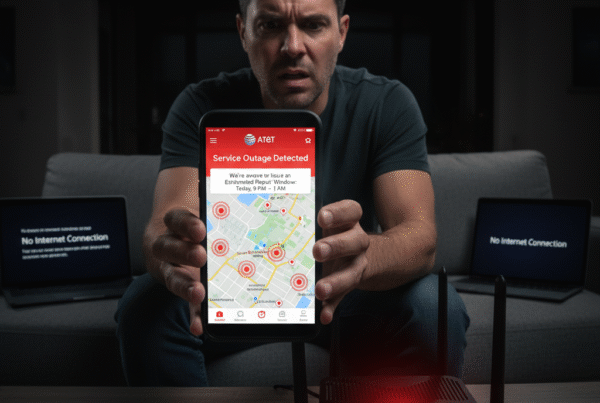

Over the past several days, AT&T customers across USA and multiple states have reported one of the most confusing types of outages:
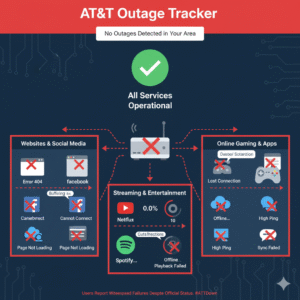
✅ Some websites load
✅ Some apps work
❌ Others refuse to load entirely
❌ Streaming buffers endlessly
❌ Online gaming becomes unusable
For many users, this has now stretched into four or more days of unstable or unusable AT&T Fiber service — with minimal communication from AT&T about the cause.
At Best ISP Deals, we understand how disruptive this kind of outage can be, especially when customers rely on their home connection for work, school, banking, and entertainment. Below, we break down what’s happening, why DNS changes provide temporary relief, and why AT&T remains mostly silent on the issue.
1. What’s Actually Causing the Outage?
Although many customers initially believed AT&T Fiber itself was down, the outage appears to stem from a combination of:
✅ DNS issues
Many reports confirm that switching DNS to Google’s 8.8.8.8 instantly fixes websites — but only for 30–60 minutes.
✅ Routing failures between AT&T and external networks
Customers across USA, Texas, Florida, Georgia, North Carolina, Alabama, Tennessee, Oklahoma, and Missouri all describe identical symptoms:
- “Some websites load instantly, others don’t load at all.”
- “Streaming apps open, but videos never start.”
- “Games won’t connect to servers.”
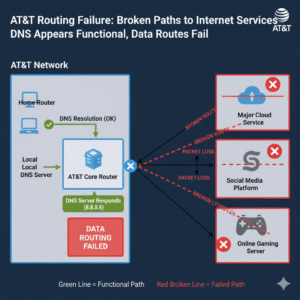
This points to routing table corruption or peering path failures — meaning AT&T can resolve a domain, but cannot reach the server hosting the site.
✅ Possible AWS-related regional impacts
Around the same time, AWS experienced a major outage. Even after AWS restored service, many AT&T customers still struggle, pointing to multiple overlapping network issues.
✅ AT&T systems not acknowledging outages
Many customers report AT&T’s “Check Outage Tool” endlessly looping or listing new, inconsistent “reported times.”
2. Why Changing DNS Works — Temporarily
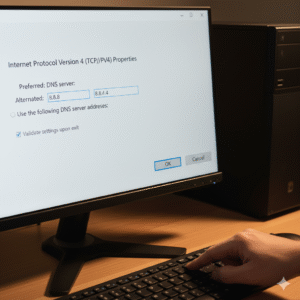
Across USA, users quickly discovered that switching DNS to 8.8.8.8 (Google) or Cloudflare temporarily restored service.
However, the fix lasts only 30–60 minutes for many customers.
Why this happens:
- DNS resolves a domain name → server IP.
- But if AT&T’s routing tables cannot reach that IP after resolution…
✅ DNS works
❌ The website still fails to load
This is why some customers say:
- “Wireless works but Ethernet doesn’t.”
- “Apps work on phone but not on PC.”
- “Some pages load only in Brave or Firefox.”
Different devices and browsers use different fallback DNS caches, so the experience becomes inconsistent.
3. What AT&T Customers Across USA Are Reporting
The trend is consistent and widespread:
✅ Extreme slowdown or failure to load certain websites
Even checking credit card sites, banks, or common apps becomes impossible.
✅ Unusable gaming connections
Gamers report lag, failure to connect to servers, and packet loss.
✅ Wi-Fi works but wired doesn’t — or vice versa
The issue is not the Wi-Fi or modem — it’s inconsistent routing.
✅ AT&T support is overwhelmed
Users describe:
- 2–14 hour wait times
- Tech visits that accomplish nothing
- Modem replacements that do not fix the issue
- Scripted responses with no acknowledgment of an outage
✅ Outage reportedly ongoing for 3–7+ days
In some USA neighborhoods, customers have had no functioning internet for nearly a week.
4. Why AT&T Hasn’t Made an Official Statement
AT&T rarely acknowledges routing or peering issues publicly. These problems often involve:
- Third-party carriers between AT&T and destination servers
- Regional routing table corruption
- Misconfigured DNS resolvers
- Congested or failing peering points
- AWS-related dependencies
Because these failures do not take the entire network offline, AT&T is slow to classify them as “outages.”
Customers, however, experience them as complete service failures.
5. Temporary Workarounds for Users in USA
Although not permanent fixes, these steps can help restore partial functionality:
✅ Switch DNS manually to:
Google DNS:
8.8.8.8
8.8.4.4
Cloudflare DNS:
1.1.1.1
1.0.0.1
✅ Use a secure VPN or Cloudflare WARP
Many customers report that WARP bypasses AT&T’s broken routes entirely.
✅ Use mobile hotspot temporarily
For work-from-home users in USA, hotspotting often fully bypasses the routing issue.
✅ Do not factory-reset your modem
This does not fix the issue and only wastes time.
6. How Best ISP Deals Helps During AT&T Outages
At Best ISP Deals, we monitor major ISPs daily so customers in USA understand:
- What’s causing the outage
- Whether it’s local or nationwide
- How to get accurate troubleshooting steps
- How to avoid misinformation and reseller scams
- Whether switching providers in your area makes sense
While AT&T’s outage communication may be unclear, we’ll always provide transparent updates based on verified network data.
Conclusion
AT&T customers across USA and beyond are dealing with a complex outage involving DNS instability and regional routing failures. While AT&T has yet to provide a clear explanation, user reports show widespread disruption affecting everything from gaming to banking to streaming.
Temporary fixes like DNS changes may help, but the underlying issue must be resolved by AT&T’s network teams — not customers.
At BestISPDeals, our focus is keeping you informed, protected, and connected with accurate insights and reliable service guidance.